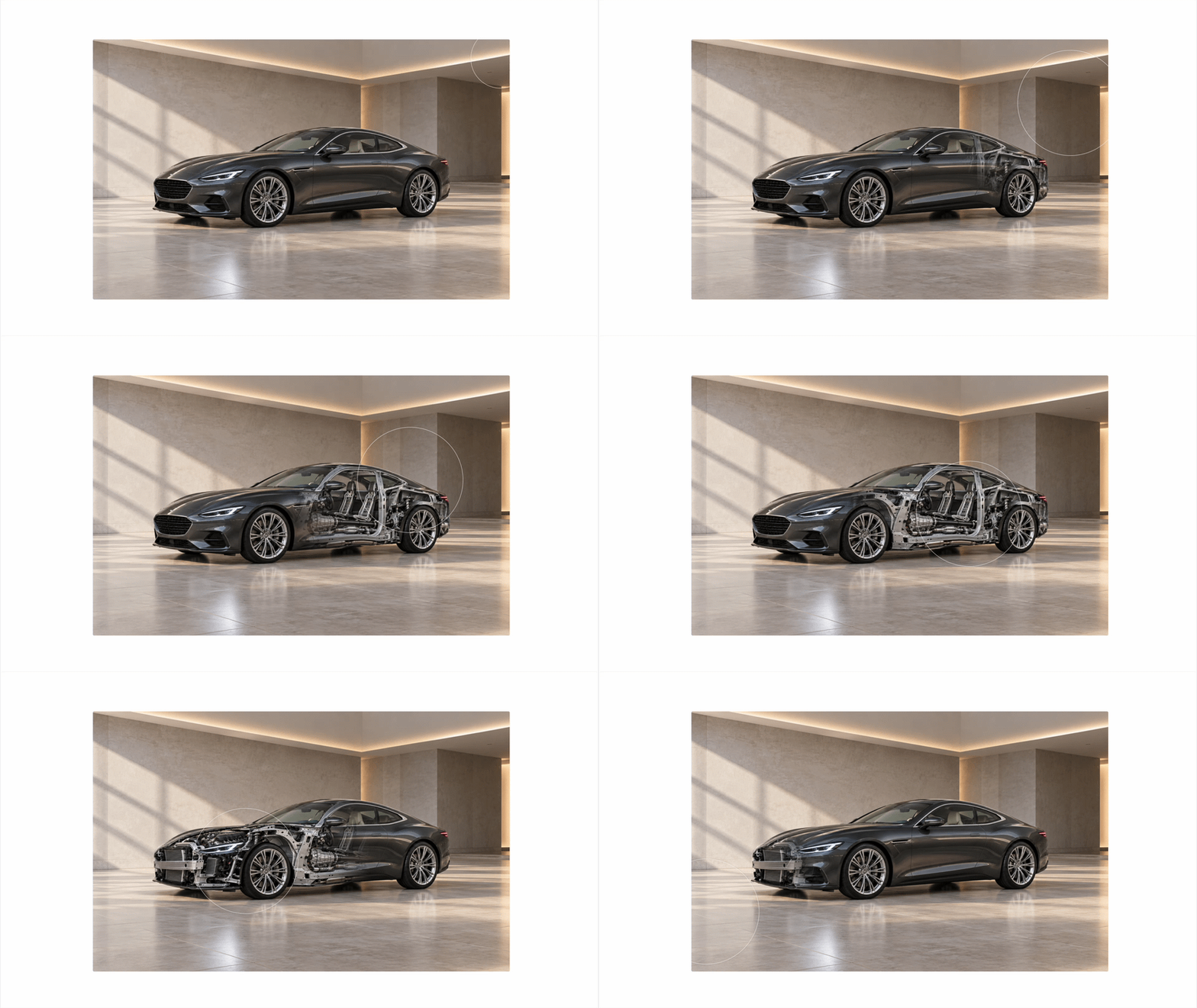
Изображение с эффектом перехода по скроллу
При пролистывании страницы вниз изображение постепенно меняется. Например, так можно показать здание или интерьер при дневном и ночном свете.
Промпт
Вы можете скопировать промпт и вставить его в вайб блок в поле ввода. Подробнее в инструкции.
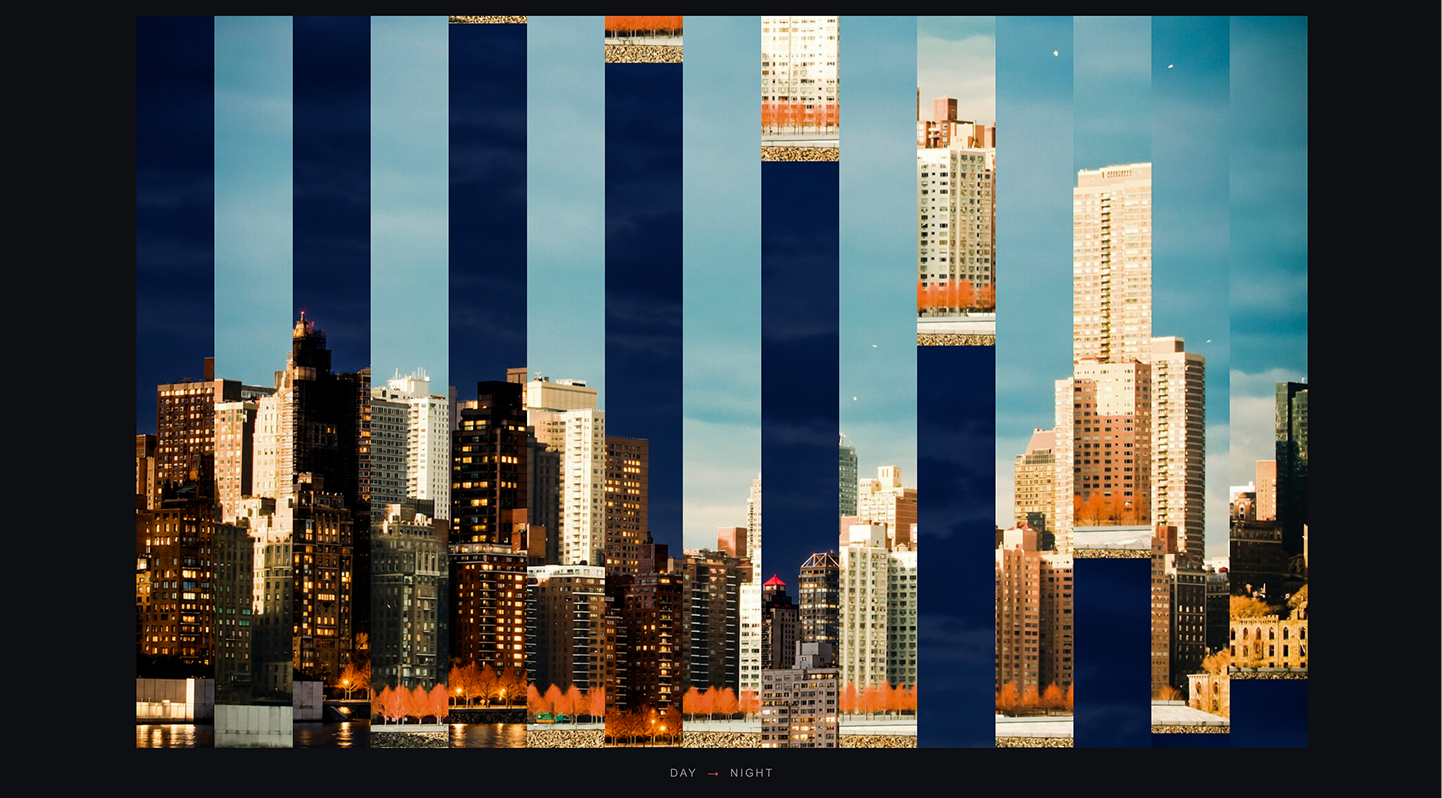
Создай блок «Day → Night»: фотография города при прокрутке превращается из дневной в ночную, разделяясь на вертикальные полосы, которые с разными задержками сдвигаются вверх, как ленты механического табло. Только вертикальный сдвиг фрагментов, без 3D-поворота и кроссфейда.
Изображения:
Day: static.tildacdn.com/tild6663-3633-4966-a231-376233373830/photo-1435738623530-.jpg
Night: static.tildacdn.com/tild3832-3363-4236-b465-666263646539/ChatGPT_Image_23__20.png
Фон секции #0D0F12, высота 240vh. Внутри sticky top:0, height:100vh, flex-центр по обеим осям, padding 70px по вертикали. У секции overflow:clip. Кадр min(92vw, 1180px), 16:10, overflow:hidden, без рамки, скруглений и тени. Под ним через 18px подпись «DAY → NIGHT»: Arial/Helvetica 11px regular, трекинг .18em, текст rgba(255,255,255,.55), стрелка #E9704F, промежутки 10px. Без других заголовков и кнопок.
Раздели кадр на N вертикальных полос: 15 на десктопе ≥1200px, 11 на планшете 768−1199px, 7 на телефоне ≤767px. Полоса обрезает содержимое по своим размерам. Внутри лента высотой 200%: верхняя половина — фрагмент Day, нижняя — тот же фрагмент Night. Оба фото на полный кадр WxH: background-size:Wpx Hpx, background-position-x:-i*W/N. Полосы собирают цельный кадр. Ширина полосы W/N+.5px, margin-right:-.5px против швов.
Привяжи анимацию к скроллу секции: p=clamp(-sectionRect.top/(sectionHeight-innerHeight), 0,1). Сглаживай p через rAF/lerp .14 с поправкой на длительность кадра: factor=1-(1-.14)^(delta/16.67). До 16% показывай дневной кадр, после 84% — ночной. Для полосы i (индекс с нуля): order=i%2===0? i/2: N-1-(i-1)/2; start=.16+order/(N-1)*.42; t=clamp((p-start)/.26,0,1). Применяй easeInOutCubic(t) и translate3d(0,-50*eased%, 0) к ленте. Получится чередующаяся волна, обратимая при прокрутке назад; положение задаёт скролл, не таймер.
Планшет: секция 220vh, кадр 3:2. Телефон: секция 200vh, ширина кадра calc(100vw - 28px), пропорции 4:5. Подпись и sticky сохраняются.
Исходные фото — два img с alt и data-vb-role="from"/"to"; полосы JS строит из их src, конструкция aria-hidden. Для выбора фото в редакторе поверх кадра невидимый (opacity:0) слой с двумя img по половине ширины, pointer-events:auto. При resize пересчитывай полосы и фон через ResizeObserver, debounce 150ms; после загрузки фото обновляй кадр. При выходе секции за экран и скрытии вкладки останавливай rAF. Изолируй CSS/JS, поддержи несколько экземпляров без повторной инициализации. Без JS и при reduced-motion показывай два исходных фото вертикально, без sticky и анимации, высота секции auto.
Контент должен легко редактироваться в Тильде: все карточки, фото и тексты сразу в HTML, без генерации через JS, массивы, innerHTML или canvas. Фото — img с data-tilda-img="y", тексты — с data-tilda-edit="y". JS только для анимации и синхронизации декоративных фрагментов с главным img. В редакторе покажи главное фото и все обороты статично для выбора и замены контента; не перехватывай клики.
Изображения:
Day: static.tildacdn.com/tild6663-3633-4966-a231-376233373830/photo-1435738623530-.jpg
Night: static.tildacdn.com/tild3832-3363-4236-b465-666263646539/ChatGPT_Image_23__20.png
Фон секции #0D0F12, высота 240vh. Внутри sticky top:0, height:100vh, flex-центр по обеим осям, padding 70px по вертикали. У секции overflow:clip. Кадр min(92vw, 1180px), 16:10, overflow:hidden, без рамки, скруглений и тени. Под ним через 18px подпись «DAY → NIGHT»: Arial/Helvetica 11px regular, трекинг .18em, текст rgba(255,255,255,.55), стрелка #E9704F, промежутки 10px. Без других заголовков и кнопок.
Раздели кадр на N вертикальных полос: 15 на десктопе ≥1200px, 11 на планшете 768−1199px, 7 на телефоне ≤767px. Полоса обрезает содержимое по своим размерам. Внутри лента высотой 200%: верхняя половина — фрагмент Day, нижняя — тот же фрагмент Night. Оба фото на полный кадр WxH: background-size:Wpx Hpx, background-position-x:-i*W/N. Полосы собирают цельный кадр. Ширина полосы W/N+.5px, margin-right:-.5px против швов.
Привяжи анимацию к скроллу секции: p=clamp(-sectionRect.top/(sectionHeight-innerHeight), 0,1). Сглаживай p через rAF/lerp .14 с поправкой на длительность кадра: factor=1-(1-.14)^(delta/16.67). До 16% показывай дневной кадр, после 84% — ночной. Для полосы i (индекс с нуля): order=i%2===0? i/2: N-1-(i-1)/2; start=.16+order/(N-1)*.42; t=clamp((p-start)/.26,0,1). Применяй easeInOutCubic(t) и translate3d(0,-50*eased%, 0) к ленте. Получится чередующаяся волна, обратимая при прокрутке назад; положение задаёт скролл, не таймер.
Планшет: секция 220vh, кадр 3:2. Телефон: секция 200vh, ширина кадра calc(100vw - 28px), пропорции 4:5. Подпись и sticky сохраняются.
Исходные фото — два img с alt и data-vb-role="from"/"to"; полосы JS строит из их src, конструкция aria-hidden. Для выбора фото в редакторе поверх кадра невидимый (opacity:0) слой с двумя img по половине ширины, pointer-events:auto. При resize пересчитывай полосы и фон через ResizeObserver, debounce 150ms; после загрузки фото обновляй кадр. При выходе секции за экран и скрытии вкладки останавливай rAF. Изолируй CSS/JS, поддержи несколько экземпляров без повторной инициализации. Без JS и при reduced-motion показывай два исходных фото вертикально, без sticky и анимации, высота секции auto.
Контент должен легко редактироваться в Тильде: все карточки, фото и тексты сразу в HTML, без генерации через JS, массивы, innerHTML или canvas. Фото — img с data-tilda-img="y", тексты — с data-tilda-edit="y". JS только для анимации и синхронизации декоративных фрагментов с главным img. В редакторе покажи главное фото и все обороты статично для выбора и замены контента; не перехватывай клики.
Код
Вы можете скопировать код и вставить его в вайб блок в раздел код. Подробнее в инструкции.
<!--
SLAT MORPH BLOCK — departure-board photograph flip
=====================================================
CONTENT vs STRUCTURE:
• Content lives in the two <img data-vb-role="from/to"> tags below.
• The <div class="vbm-rack"> and every slat inside it are built by the script
from those two images. They are structure, not content.
• To change photos: edit the <img> src attributes in the markup.
• The rack is aria-hidden="true" — the authored <img> tags are the accessible content.
=====================================================
-->
<section class="vbm-section" data-vbm-instance="" aria-label="City at day and night — slat morph transition">
<!-- Sticky viewport -->
<div class="vbm-sticky">
<!-- Authored content: overlaid on top of the frame at full size so Tilda's
editor can click through to them. opacity:0 hides them visually while
keeping them fully clickable and discoverable by the image picker. -->
<div class="vbm-authored" aria-hidden="false">
<img data-vb-role="from" src="https://static.tildacdn.com/tild6663-3633-4966-a231-376233373830/photo-1435738623530-.jpg" alt="City skyline in daylight — towers and streets bathed in warm afternoon sun" class="vbm-authored__img vbm-authored__img--from">
<img data-vb-role="to" src="https://static.tildacdn.com/tild3832-3363-4236-b465-666263646539/ChatGPT_Image_23__20.png" alt="The same city skyline after dark — buildings lit against a deep night sky" class="vbm-authored__img vbm-authored__img--to">
</div>
<!-- Frame: aspect-ratio container -->
<div class="vbm-frame" data-vbm-frame="">
<!-- Rack: built entirely by the script from the two authored images above.
aria-hidden: this is a decorative reconstruction; the real alt text is on the <img> tags. -->
<div class="vbm-rack" data-vbm-rack="" aria-hidden="true"></div>
</div>
<!-- Caption -->
<p class="vbm-caption">
<span class="vbm-caption__from">Day</span>
<span class="vbm-caption__sep" aria-hidden="true">→</span>
<span class="vbm-caption__to">Night</span>
</p>
</div><!-- /sticky -->
</section>
<style>
/* =====================================================
TOKENS
===================================================== */
.vbm-section {
--vb-bg: #0D0F12;
--vb-text: #FFFFFF;
--vb-muted: rgba(255,255,255,0.55);
--vb-accent: #E9704F;
}
/* =====================================================
BOX MODEL RESET
===================================================== */
.vbm-section,
.vbm-section * {
box-sizing: border-box;
}
/* =====================================================
SECTION
===================================================== */
.vbm-section {
position: relative;
height: 240vh;
background: var(--vb-bg);
/* ensure no overflow clipping that would break sticky */
overflow: clip; /* clip, not hidden — doesn't create a scroll container */
}
/* =====================================================
AUTHORED IMAGES
Positioned over the frame at its exact size so Tilda's editor
can click on them. opacity:0 keeps them invisible while JS is
active; pointer-events remain on so the editor hit-test works.
===================================================== */
.vbm-authored {
/* Sits on top of the frame, same dimensions, fully clickable */
position: absolute;
/* sized and centered to match .vbm-frame */
width: min(92vw, 1180px);
aspect-ratio: 16 / 10;
display: flex;
z-index: 1; /* above the rack */
/* invisible but hittable — Tilda editor can click through */
opacity: 0;
}
/* JS active: keep invisible overlay so editor can still click */
.vbm-section[data-vbm-ready] .vbm-authored {
opacity: 0;
pointer-events: auto;
}
.vbm-authored__img {
display: block;
width: 50%;
height: 100%;
object-fit: cover;
flex: 0 0 50%;
}
/* No-JS fallback: show images stacked, hide sticky */
.vbm-section:not([data-vbm-ready]) .vbm-authored {
position: static;
width: auto;
aspect-ratio: unset;
height: auto;
opacity: 1;
flex-direction: column;
padding: 40px 14px;
gap: 20px;
}
.vbm-section:not([data-vbm-ready]) .vbm-authored__img {
width: 100%;
height: auto;
flex: none;
}
.vbm-section:not([data-vbm-ready]) .vbm-sticky {
display: none;
}
/* =====================================================
STICKY CHILD
===================================================== */
.vbm-sticky {
position: sticky;
top: 0;
height: 100vh;
display: flex;
flex-direction: column;
align-items: center;
justify-content: center;
overflow: hidden;
padding-top: 70px;
padding-bottom: 70px;
}
/* =====================================================
FRAME
===================================================== */
.vbm-frame {
width: min(92vw, 1180px);
aspect-ratio: 16 / 10;
overflow: hidden;
position: relative;
}
/* =====================================================
RACK
===================================================== */
.vbm-rack {
display: flex;
width: 100%;
height: 100%;
position: absolute;
inset: 0;
}
/* =====================================================
SLAT (built by script)
===================================================== */
.vbm-slat {
flex: 0 0 auto;
height: 100%;
overflow: hidden;
position: relative;
}
/* =====================================================
STRIP (built by script)
===================================================== */
.vbm-strip {
position: absolute;
left: 0;
top: 0;
width: 100%;
height: 200%;
will-change: transform;
}
.vbm-strip__half {
position: absolute;
left: 0;
width: 100%;
height: 50%;
background-repeat: no-repeat;
}
.vbm-strip__half--from {
top: 0;
}
.vbm-strip__half--to {
top: 50%;
}
/* =====================================================
CAPTION
===================================================== */
.vbm-caption {
font-family: Arial, Helvetica, sans-serif;
font-size: 11px;
letter-spacing: 0.18em;
text-transform: uppercase;
color: var(--vb-muted);
margin: 18px 0 0 0;
display: flex;
align-items: center;
gap: 10px;
user-select: none;
}
.vbm-caption__sep {
color: var(--vb-accent);
letter-spacing: 0;
}
/* =====================================================
RESPONSIVE
===================================================== */
/* Tablet 768–1199px */
@media (min-width: 768px) and (max-width: 1199px) {
.vbm-section {
height: 220vh;
}
.vbm-frame {
aspect-ratio: 3 / 2;
}
.vbm-authored {
aspect-ratio: 3 / 2;
}
}
/* Mobile < 768px */
@media (max-width: 767px) {
.vbm-section {
height: 200vh;
}
.vbm-frame {
width: calc(100vw - 28px);
aspect-ratio: 4 / 5;
}
.vbm-authored {
width: calc(100vw - 28px);
aspect-ratio: 4 / 5;
}
}
/* =====================================================
REDUCED MOTION
===================================================== */
@media (prefers-reduced-motion: reduce) {
/* A mechanical flip has no gentle version — show content instead */
.vbm-section {
height: auto !important;
}
.vbm-sticky {
position: static !important;
height: auto !important;
padding: 60px 14px;
}
.vbm-frame,
.vbm-rack,
.vbm-caption {
display: none !important;
}
.vbm-authored {
position: static !important;
width: min(92vw, 1180px) !important;
height: auto !important;
aspect-ratio: unset !important;
opacity: 1 !important;
flex-direction: column !important;
display: flex !important;
gap: 24px !important;
margin: 0 auto;
padding: 0;
}
.vbm-authored__img {
width: 100% !important;
height: auto !important;
flex: none !important;
}
}
</style>
<script>
(function () {
'use strict';
/* =====================================================
SETTINGS
===================================================== */
var SLAT_COUNT = { desktop: 15, tablet: 11, mobile: 7 };
var FLIP_START = 0.16;
var FLIP_END = 0.84;
var SPREAD = 0.42;
var LERP = 0.14;
/* =====================================================
HELPERS
===================================================== */
function clamp(v, lo, hi) {
return v < lo ? lo : v > hi ? hi : v;
}
function easeInOutCubic(t) {
return t < 0.5 ? 4 * t * t * t : 1 - Math.pow(-2 * t + 2, 3) / 2;
}
function getBreakpoint() {
var w = window.innerWidth;
if (w >= 768 && w <= 1199) return 'tablet';
if (w < 768) return 'mobile';
return 'desktop';
}
function getSlatCount() {
return SLAT_COUNT[getBreakpoint()];
}
function debounce(fn, ms) {
var t;
return function () {
clearTimeout(t);
t = setTimeout(fn, ms);
};
}
/* Check reduced-motion preference */
function prefersReducedMotion() {
return window.matchMedia('(prefers-reduced-motion: reduce)').matches;
}
/* =====================================================
SlatMorph CLASS
===================================================== */
function SlatMorph(section) {
/* --- State --- */
this.section = section;
this.frame = section.querySelector('[data-vbm-frame]');
this.rack = section.querySelector('[data-vbm-rack]');
this.imgFrom = section.querySelector('[data-vb-role="from"]');
this.imgTo = section.querySelector('[data-vb-role="to"]');
this.strips = [];
this.orders = [];
this.slatCount = 0;
this.progress = 0;
this.smoothed = 0;
this.rafHandle = null;
this.running = false;
this.lastTime = null;
this.destroyed = false;
this._ro = null;
this._io = null;
this._visible = false;
this._tabVisible = !document.hidden;
/* Bind methods */
this._loop = this._loop.bind(this);
this._onVisibility = this._onVisibility.bind(this);
this._onImgLoad = this._onImgLoad.bind(this);
/* Init */
this._init();
}
SlatMorph.prototype._init = function () {
var self = this;
if (prefersReducedMotion()) {
/* Reduced motion: do nothing — CSS handles the display */
return;
}
/* Mark section as JS-ready (hides fallback authored block) */
this.section.setAttribute('data-vbm-ready', '');
/* Listen for image loads in case they aren't cached */
if (!this.imgFrom.complete) {
this.imgFrom.addEventListener('load', this._onImgLoad);
}
if (!this.imgTo.complete) {
this.imgTo.addEventListener('load', this._onImgLoad);
}
/* Build rack */
this._build();
/* ResizeObserver on the frame */
this._ro = new ResizeObserver(debounce(function () {
self._onResize();
}, 150));
this._ro.observe(this.frame);
/* IntersectionObserver to pause rAF when off-screen */
this._io = new IntersectionObserver(function (entries) {
self._visible = entries[0].isIntersecting;
self._scheduleOrPause();
}, { threshold: 0 });
this._io.observe(this.section);
/* Tab visibility */
document.addEventListener('visibilitychange', this._onVisibility);
/* Start loop */
this._scheduleOrPause();
};
SlatMorph.prototype._onImgLoad = function () {
this._build();
};
SlatMorph.prototype._onVisibility = function () {
this._tabVisible = !document.hidden;
this._scheduleOrPause();
};
SlatMorph.prototype._scheduleOrPause = function () {
if (this._visible && this._tabVisible && !this.running) {
this.running = true;
this.lastTime = null;
this.rafHandle = requestAnimationFrame(this._loop);
} else if ((!this._visible || !this._tabVisible) && this.running) {
this.running = false;
if (this.rafHandle) {
cancelAnimationFrame(this.rafHandle);
this.rafHandle = null;
}
}
};
SlatMorph.prototype._onResize = function () {
var newCount = getSlatCount();
if (newCount !== this.slatCount) {
/* Rebuild with new slat count */
this._build();
} else {
/* Just re-measure backgrounds */
this._remeasure();
}
};
/* ----- Build the rack from scratch ----- */
SlatMorph.prototype._build = function () {
var rack = this.rack;
var frame = this.frame;
var n = getSlatCount();
var fromUrl = this.imgFrom.src;
var toUrl = this.imgTo.src;
this.slatCount = n;
this.strips = [];
this.orders = [];
/* Clear existing slats */
while (rack.firstChild) rack.removeChild(rack.firstChild);
/* Frame dimensions (live measurement) */
var fw = frame.offsetWidth;
var fh = frame.offsetHeight;
/* Slat pixel width + the half-pixel overlap */
var slatBase = fw / n;
var slatRender = slatBase + 0.5; /* load-bearing — prevents hairline gaps */
/* Background size string matches the full frame */
var bgSize = fw + 'px ' + fh + 'px';
/* Compute order lookup: alternating outward from both edges */
var orders = new Array(n);
for (var i = 0; i < n; i++) {
orders[i] = (i % 2 === 0) ? (i / 2) : (n - 1 - (i - 1) / 2);
}
this.orders = orders;
for (var idx = 0; idx < n; idx++) {
/* --- Slat element --- */
var slat = document.createElement('div');
slat.className = 'vbm-slat';
slat.style.width = slatRender + 'px';
slat.style.marginRight = '-0.5px';
/* --- Strip --- */
var strip = document.createElement('div');
strip.className = 'vbm-strip';
/* Background X offset: positions the correct slice of the full image */
var bgX = -(idx * slatBase) + 'px';
/* --- From half (top) --- */
var halfFrom = document.createElement('div');
halfFrom.className = 'vbm-strip__half vbm-strip__half--from';
halfFrom.style.backgroundImage = 'url(' + fromUrl + ')';
halfFrom.style.backgroundSize = bgSize;
halfFrom.style.backgroundPosition = bgX + ' 0px';
/* --- To half (bottom) --- */
var halfTo = document.createElement('div');
halfTo.className = 'vbm-strip__half vbm-strip__half--to';
halfTo.style.backgroundImage = 'url(' + toUrl + ')';
halfTo.style.backgroundSize = bgSize;
halfTo.style.backgroundPosition = bgX + ' 0px';
strip.appendChild(halfFrom);
strip.appendChild(halfTo);
slat.appendChild(strip);
rack.appendChild(slat);
this.strips.push(strip);
}
};
/* ----- Re-measure (same slat count, just update bg-size/position) ----- */
SlatMorph.prototype._remeasure = function () {
var n = this.slatCount;
var fw = this.frame.offsetWidth;
var fh = this.frame.offsetHeight;
var bgSize = fw + 'px ' + fh + 'px';
var slats = this.rack.querySelectorAll('.vbm-slat');
var slatBase = fw / n;
var slatRender = slatBase + 0.5;
for (var i = 0; i < slats.length; i++) {
var slat = slats[i];
var strip = slat.querySelector('.vbm-strip');
var halves = slat.querySelectorAll('.vbm-strip__half');
var bgX = -(i * slatBase) + 'px';
slat.style.width = slatRender + 'px';
for (var h = 0; h < halves.length; h++) {
halves[h].style.backgroundSize = bgSize;
halves[h].style.backgroundPosition = bgX + ' 0px';
}
}
};
/* ----- Animation loop ----- */
SlatMorph.prototype._loop = function (now) {
if (this.destroyed || !this.running) return;
/* Delta for frame-rate–corrected LERP */
var delta = this.lastTime ? now - this.lastTime : 16.67;
this.lastTime = now;
delta = clamp(delta, 1, 100); /* guard against tab resume spike */
/* --- Read scroll progress (rect read, no layout write yet) --- */
var rect = this.section.getBoundingClientRect();
var sectionH = this.section.offsetHeight;
var viewportH = window.innerHeight;
var rawProgress = clamp(-rect.top / (sectionH - viewportH), 0, 1);
/* Frame-rate–corrected LERP */
var lerpFactor = 1 - Math.pow(1 - LERP, delta / 16.67);
this.smoothed += (rawProgress - this.smoothed) * lerpFactor;
var prog = this.smoothed;
var n = this.slatCount;
var span = (FLIP_END - FLIP_START) - SPREAD;
/* --- Write transforms --- */
for (var i = 0; i < n; i++) {
var order = this.orders[i];
var start = FLIP_START + (order / (n - 1)) * SPREAD;
var local = clamp((prog - start) / span, 0, 1);
var eased = easeInOutCubic(local);
/* -50% of strip's own height = exactly one half-height = one image */
this.strips[i].style.transform = 'translate3d(0, ' + (-50 * eased) + '%, 0)';
}
this.rafHandle = requestAnimationFrame(this._loop);
};
/* ----- Teardown ----- */
SlatMorph.prototype.destroy = function () {
this.destroyed = true;
this.running = false;
if (this.rafHandle) cancelAnimationFrame(this.rafHandle);
if (this._ro) this._ro.disconnect();
if (this._io) this._io.disconnect();
document.removeEventListener('visibilitychange', this._onVisibility);
this.imgFrom.removeEventListener('load', this._onImgLoad);
this.imgTo.removeEventListener('load', this._onImgLoad);
};
/* =====================================================
INIT — support multiple instances per page
===================================================== */
var instances = [];
document.querySelectorAll('[data-vbm-instance]').forEach(function (section) {
/* Guard: do not double-init */
if (section.hasAttribute('data-vbm-booted')) return;
section.setAttribute('data-vbm-booted', '');
instances.push(new SlatMorph(section));
});
/* Expose destroy on section element for external teardown if needed */
instances.forEach(function (inst) {
inst.section._vbmDestroy = inst.destroy.bind(inst);
});
}());
</script>
SLAT MORPH BLOCK — departure-board photograph flip
=====================================================
CONTENT vs STRUCTURE:
• Content lives in the two <img data-vb-role="from/to"> tags below.
• The <div class="vbm-rack"> and every slat inside it are built by the script
from those two images. They are structure, not content.
• To change photos: edit the <img> src attributes in the markup.
• The rack is aria-hidden="true" — the authored <img> tags are the accessible content.
=====================================================
-->
<section class="vbm-section" data-vbm-instance="" aria-label="City at day and night — slat morph transition">
<!-- Sticky viewport -->
<div class="vbm-sticky">
<!-- Authored content: overlaid on top of the frame at full size so Tilda's
editor can click through to them. opacity:0 hides them visually while
keeping them fully clickable and discoverable by the image picker. -->
<div class="vbm-authored" aria-hidden="false">
<img data-vb-role="from" src="https://static.tildacdn.com/tild6663-3633-4966-a231-376233373830/photo-1435738623530-.jpg" alt="City skyline in daylight — towers and streets bathed in warm afternoon sun" class="vbm-authored__img vbm-authored__img--from">
<img data-vb-role="to" src="https://static.tildacdn.com/tild3832-3363-4236-b465-666263646539/ChatGPT_Image_23__20.png" alt="The same city skyline after dark — buildings lit against a deep night sky" class="vbm-authored__img vbm-authored__img--to">
</div>
<!-- Frame: aspect-ratio container -->
<div class="vbm-frame" data-vbm-frame="">
<!-- Rack: built entirely by the script from the two authored images above.
aria-hidden: this is a decorative reconstruction; the real alt text is on the <img> tags. -->
<div class="vbm-rack" data-vbm-rack="" aria-hidden="true"></div>
</div>
<!-- Caption -->
<p class="vbm-caption">
<span class="vbm-caption__from">Day</span>
<span class="vbm-caption__sep" aria-hidden="true">→</span>
<span class="vbm-caption__to">Night</span>
</p>
</div><!-- /sticky -->
</section>
<style>
/* =====================================================
TOKENS
===================================================== */
.vbm-section {
--vb-bg: #0D0F12;
--vb-text: #FFFFFF;
--vb-muted: rgba(255,255,255,0.55);
--vb-accent: #E9704F;
}
/* =====================================================
BOX MODEL RESET
===================================================== */
.vbm-section,
.vbm-section * {
box-sizing: border-box;
}
/* =====================================================
SECTION
===================================================== */
.vbm-section {
position: relative;
height: 240vh;
background: var(--vb-bg);
/* ensure no overflow clipping that would break sticky */
overflow: clip; /* clip, not hidden — doesn't create a scroll container */
}
/* =====================================================
AUTHORED IMAGES
Positioned over the frame at its exact size so Tilda's editor
can click on them. opacity:0 keeps them invisible while JS is
active; pointer-events remain on so the editor hit-test works.
===================================================== */
.vbm-authored {
/* Sits on top of the frame, same dimensions, fully clickable */
position: absolute;
/* sized and centered to match .vbm-frame */
width: min(92vw, 1180px);
aspect-ratio: 16 / 10;
display: flex;
z-index: 1; /* above the rack */
/* invisible but hittable — Tilda editor can click through */
opacity: 0;
}
/* JS active: keep invisible overlay so editor can still click */
.vbm-section[data-vbm-ready] .vbm-authored {
opacity: 0;
pointer-events: auto;
}
.vbm-authored__img {
display: block;
width: 50%;
height: 100%;
object-fit: cover;
flex: 0 0 50%;
}
/* No-JS fallback: show images stacked, hide sticky */
.vbm-section:not([data-vbm-ready]) .vbm-authored {
position: static;
width: auto;
aspect-ratio: unset;
height: auto;
opacity: 1;
flex-direction: column;
padding: 40px 14px;
gap: 20px;
}
.vbm-section:not([data-vbm-ready]) .vbm-authored__img {
width: 100%;
height: auto;
flex: none;
}
.vbm-section:not([data-vbm-ready]) .vbm-sticky {
display: none;
}
/* =====================================================
STICKY CHILD
===================================================== */
.vbm-sticky {
position: sticky;
top: 0;
height: 100vh;
display: flex;
flex-direction: column;
align-items: center;
justify-content: center;
overflow: hidden;
padding-top: 70px;
padding-bottom: 70px;
}
/* =====================================================
FRAME
===================================================== */
.vbm-frame {
width: min(92vw, 1180px);
aspect-ratio: 16 / 10;
overflow: hidden;
position: relative;
}
/* =====================================================
RACK
===================================================== */
.vbm-rack {
display: flex;
width: 100%;
height: 100%;
position: absolute;
inset: 0;
}
/* =====================================================
SLAT (built by script)
===================================================== */
.vbm-slat {
flex: 0 0 auto;
height: 100%;
overflow: hidden;
position: relative;
}
/* =====================================================
STRIP (built by script)
===================================================== */
.vbm-strip {
position: absolute;
left: 0;
top: 0;
width: 100%;
height: 200%;
will-change: transform;
}
.vbm-strip__half {
position: absolute;
left: 0;
width: 100%;
height: 50%;
background-repeat: no-repeat;
}
.vbm-strip__half--from {
top: 0;
}
.vbm-strip__half--to {
top: 50%;
}
/* =====================================================
CAPTION
===================================================== */
.vbm-caption {
font-family: Arial, Helvetica, sans-serif;
font-size: 11px;
letter-spacing: 0.18em;
text-transform: uppercase;
color: var(--vb-muted);
margin: 18px 0 0 0;
display: flex;
align-items: center;
gap: 10px;
user-select: none;
}
.vbm-caption__sep {
color: var(--vb-accent);
letter-spacing: 0;
}
/* =====================================================
RESPONSIVE
===================================================== */
/* Tablet 768–1199px */
@media (min-width: 768px) and (max-width: 1199px) {
.vbm-section {
height: 220vh;
}
.vbm-frame {
aspect-ratio: 3 / 2;
}
.vbm-authored {
aspect-ratio: 3 / 2;
}
}
/* Mobile < 768px */
@media (max-width: 767px) {
.vbm-section {
height: 200vh;
}
.vbm-frame {
width: calc(100vw - 28px);
aspect-ratio: 4 / 5;
}
.vbm-authored {
width: calc(100vw - 28px);
aspect-ratio: 4 / 5;
}
}
/* =====================================================
REDUCED MOTION
===================================================== */
@media (prefers-reduced-motion: reduce) {
/* A mechanical flip has no gentle version — show content instead */
.vbm-section {
height: auto !important;
}
.vbm-sticky {
position: static !important;
height: auto !important;
padding: 60px 14px;
}
.vbm-frame,
.vbm-rack,
.vbm-caption {
display: none !important;
}
.vbm-authored {
position: static !important;
width: min(92vw, 1180px) !important;
height: auto !important;
aspect-ratio: unset !important;
opacity: 1 !important;
flex-direction: column !important;
display: flex !important;
gap: 24px !important;
margin: 0 auto;
padding: 0;
}
.vbm-authored__img {
width: 100% !important;
height: auto !important;
flex: none !important;
}
}
</style>
<script>
(function () {
'use strict';
/* =====================================================
SETTINGS
===================================================== */
var SLAT_COUNT = { desktop: 15, tablet: 11, mobile: 7 };
var FLIP_START = 0.16;
var FLIP_END = 0.84;
var SPREAD = 0.42;
var LERP = 0.14;
/* =====================================================
HELPERS
===================================================== */
function clamp(v, lo, hi) {
return v < lo ? lo : v > hi ? hi : v;
}
function easeInOutCubic(t) {
return t < 0.5 ? 4 * t * t * t : 1 - Math.pow(-2 * t + 2, 3) / 2;
}
function getBreakpoint() {
var w = window.innerWidth;
if (w >= 768 && w <= 1199) return 'tablet';
if (w < 768) return 'mobile';
return 'desktop';
}
function getSlatCount() {
return SLAT_COUNT[getBreakpoint()];
}
function debounce(fn, ms) {
var t;
return function () {
clearTimeout(t);
t = setTimeout(fn, ms);
};
}
/* Check reduced-motion preference */
function prefersReducedMotion() {
return window.matchMedia('(prefers-reduced-motion: reduce)').matches;
}
/* =====================================================
SlatMorph CLASS
===================================================== */
function SlatMorph(section) {
/* --- State --- */
this.section = section;
this.frame = section.querySelector('[data-vbm-frame]');
this.rack = section.querySelector('[data-vbm-rack]');
this.imgFrom = section.querySelector('[data-vb-role="from"]');
this.imgTo = section.querySelector('[data-vb-role="to"]');
this.strips = [];
this.orders = [];
this.slatCount = 0;
this.progress = 0;
this.smoothed = 0;
this.rafHandle = null;
this.running = false;
this.lastTime = null;
this.destroyed = false;
this._ro = null;
this._io = null;
this._visible = false;
this._tabVisible = !document.hidden;
/* Bind methods */
this._loop = this._loop.bind(this);
this._onVisibility = this._onVisibility.bind(this);
this._onImgLoad = this._onImgLoad.bind(this);
/* Init */
this._init();
}
SlatMorph.prototype._init = function () {
var self = this;
if (prefersReducedMotion()) {
/* Reduced motion: do nothing — CSS handles the display */
return;
}
/* Mark section as JS-ready (hides fallback authored block) */
this.section.setAttribute('data-vbm-ready', '');
/* Listen for image loads in case they aren't cached */
if (!this.imgFrom.complete) {
this.imgFrom.addEventListener('load', this._onImgLoad);
}
if (!this.imgTo.complete) {
this.imgTo.addEventListener('load', this._onImgLoad);
}
/* Build rack */
this._build();
/* ResizeObserver on the frame */
this._ro = new ResizeObserver(debounce(function () {
self._onResize();
}, 150));
this._ro.observe(this.frame);
/* IntersectionObserver to pause rAF when off-screen */
this._io = new IntersectionObserver(function (entries) {
self._visible = entries[0].isIntersecting;
self._scheduleOrPause();
}, { threshold: 0 });
this._io.observe(this.section);
/* Tab visibility */
document.addEventListener('visibilitychange', this._onVisibility);
/* Start loop */
this._scheduleOrPause();
};
SlatMorph.prototype._onImgLoad = function () {
this._build();
};
SlatMorph.prototype._onVisibility = function () {
this._tabVisible = !document.hidden;
this._scheduleOrPause();
};
SlatMorph.prototype._scheduleOrPause = function () {
if (this._visible && this._tabVisible && !this.running) {
this.running = true;
this.lastTime = null;
this.rafHandle = requestAnimationFrame(this._loop);
} else if ((!this._visible || !this._tabVisible) && this.running) {
this.running = false;
if (this.rafHandle) {
cancelAnimationFrame(this.rafHandle);
this.rafHandle = null;
}
}
};
SlatMorph.prototype._onResize = function () {
var newCount = getSlatCount();
if (newCount !== this.slatCount) {
/* Rebuild with new slat count */
this._build();
} else {
/* Just re-measure backgrounds */
this._remeasure();
}
};
/* ----- Build the rack from scratch ----- */
SlatMorph.prototype._build = function () {
var rack = this.rack;
var frame = this.frame;
var n = getSlatCount();
var fromUrl = this.imgFrom.src;
var toUrl = this.imgTo.src;
this.slatCount = n;
this.strips = [];
this.orders = [];
/* Clear existing slats */
while (rack.firstChild) rack.removeChild(rack.firstChild);
/* Frame dimensions (live measurement) */
var fw = frame.offsetWidth;
var fh = frame.offsetHeight;
/* Slat pixel width + the half-pixel overlap */
var slatBase = fw / n;
var slatRender = slatBase + 0.5; /* load-bearing — prevents hairline gaps */
/* Background size string matches the full frame */
var bgSize = fw + 'px ' + fh + 'px';
/* Compute order lookup: alternating outward from both edges */
var orders = new Array(n);
for (var i = 0; i < n; i++) {
orders[i] = (i % 2 === 0) ? (i / 2) : (n - 1 - (i - 1) / 2);
}
this.orders = orders;
for (var idx = 0; idx < n; idx++) {
/* --- Slat element --- */
var slat = document.createElement('div');
slat.className = 'vbm-slat';
slat.style.width = slatRender + 'px';
slat.style.marginRight = '-0.5px';
/* --- Strip --- */
var strip = document.createElement('div');
strip.className = 'vbm-strip';
/* Background X offset: positions the correct slice of the full image */
var bgX = -(idx * slatBase) + 'px';
/* --- From half (top) --- */
var halfFrom = document.createElement('div');
halfFrom.className = 'vbm-strip__half vbm-strip__half--from';
halfFrom.style.backgroundImage = 'url(' + fromUrl + ')';
halfFrom.style.backgroundSize = bgSize;
halfFrom.style.backgroundPosition = bgX + ' 0px';
/* --- To half (bottom) --- */
var halfTo = document.createElement('div');
halfTo.className = 'vbm-strip__half vbm-strip__half--to';
halfTo.style.backgroundImage = 'url(' + toUrl + ')';
halfTo.style.backgroundSize = bgSize;
halfTo.style.backgroundPosition = bgX + ' 0px';
strip.appendChild(halfFrom);
strip.appendChild(halfTo);
slat.appendChild(strip);
rack.appendChild(slat);
this.strips.push(strip);
}
};
/* ----- Re-measure (same slat count, just update bg-size/position) ----- */
SlatMorph.prototype._remeasure = function () {
var n = this.slatCount;
var fw = this.frame.offsetWidth;
var fh = this.frame.offsetHeight;
var bgSize = fw + 'px ' + fh + 'px';
var slats = this.rack.querySelectorAll('.vbm-slat');
var slatBase = fw / n;
var slatRender = slatBase + 0.5;
for (var i = 0; i < slats.length; i++) {
var slat = slats[i];
var strip = slat.querySelector('.vbm-strip');
var halves = slat.querySelectorAll('.vbm-strip__half');
var bgX = -(i * slatBase) + 'px';
slat.style.width = slatRender + 'px';
for (var h = 0; h < halves.length; h++) {
halves[h].style.backgroundSize = bgSize;
halves[h].style.backgroundPosition = bgX + ' 0px';
}
}
};
/* ----- Animation loop ----- */
SlatMorph.prototype._loop = function (now) {
if (this.destroyed || !this.running) return;
/* Delta for frame-rate–corrected LERP */
var delta = this.lastTime ? now - this.lastTime : 16.67;
this.lastTime = now;
delta = clamp(delta, 1, 100); /* guard against tab resume spike */
/* --- Read scroll progress (rect read, no layout write yet) --- */
var rect = this.section.getBoundingClientRect();
var sectionH = this.section.offsetHeight;
var viewportH = window.innerHeight;
var rawProgress = clamp(-rect.top / (sectionH - viewportH), 0, 1);
/* Frame-rate–corrected LERP */
var lerpFactor = 1 - Math.pow(1 - LERP, delta / 16.67);
this.smoothed += (rawProgress - this.smoothed) * lerpFactor;
var prog = this.smoothed;
var n = this.slatCount;
var span = (FLIP_END - FLIP_START) - SPREAD;
/* --- Write transforms --- */
for (var i = 0; i < n; i++) {
var order = this.orders[i];
var start = FLIP_START + (order / (n - 1)) * SPREAD;
var local = clamp((prog - start) / span, 0, 1);
var eased = easeInOutCubic(local);
/* -50% of strip's own height = exactly one half-height = one image */
this.strips[i].style.transform = 'translate3d(0, ' + (-50 * eased) + '%, 0)';
}
this.rafHandle = requestAnimationFrame(this._loop);
};
/* ----- Teardown ----- */
SlatMorph.prototype.destroy = function () {
this.destroyed = true;
this.running = false;
if (this.rafHandle) cancelAnimationFrame(this.rafHandle);
if (this._ro) this._ro.disconnect();
if (this._io) this._io.disconnect();
document.removeEventListener('visibilitychange', this._onVisibility);
this.imgFrom.removeEventListener('load', this._onImgLoad);
this.imgTo.removeEventListener('load', this._onImgLoad);
};
/* =====================================================
INIT — support multiple instances per page
===================================================== */
var instances = [];
document.querySelectorAll('[data-vbm-instance]').forEach(function (section) {
/* Guard: do not double-init */
if (section.hasAttribute('data-vbm-booted')) return;
section.setAttribute('data-vbm-booted', '');
instances.push(new SlatMorph(section));
});
/* Expose destroy on section element for external teardown if needed */
instances.forEach(function (inst) {
inst.section._vbmDestroy = inst.destroy.bind(inst);
});
}());
</script>
Что выбрать, промпт или код?
Копируйте промпт, если хотите получить похожий результат, но ввести информацию о своём бизнесе и задать свои требования. Например, изменить кнопки, тексты, цвета, фотографии или другие элементы.
Копируйте код, если хотите получить точно такой же блок. Чтобы его изменить, придётся отредактировать html-код.